This blog has been designed by myself, but it was improved by ChatGPT 4.0.
Introduction:
In today’s fast-paced digital age, accessing information should be as simple as having a conversation. Enter the innovative concept of a chat system that merges the capabilities of ChatGPT with Azure Cognitive Search, allowing users to “talk to their data.” This blog delves into this novel approach and its implications.
The Concept:
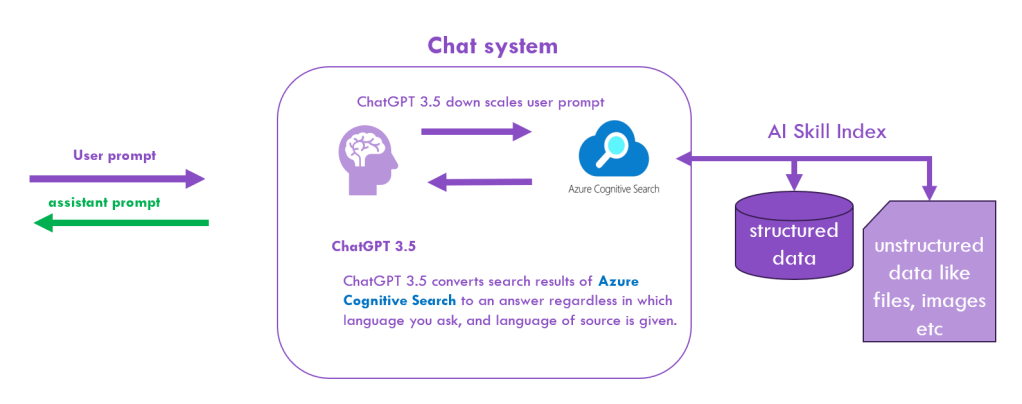
- User Prompt: Everything begins with a user posing a question or input, just as they would in any chat environment.
- ChatGPT 3.5:
- Down scaling User Prompt: Before diving into data retrieval, the system efficiently processes and simplifies the user’s question, ensuring that it’s well-structured for searching.
- Data Conversion: Once the Azure Cognitive Search fetches the relevant data, ChatGPT converts the search results into a comprehensible answer. This translation is versatile, adapting to both the language the query was made in and the language of the source data.
- Azure Cognitive Search: The heart of our data retrieval system. This powerful tool digs through:
- Structured Data: Databases, tables, and other organized repositories.
- Unstructured Data: Such as files, images, documents, and more, ensuring no stone is left unturned.
Implications & Advantages:
- Intuitive Interaction: The system feels like chatting with an expert who instantly fetches and decodes information from vast data reservoirs.
- Language Agnostic: With ChatGPT’s capabilities, the system transcends language barriers, making it universally accessible.
- Swift & Efficient: By interfacing directly with Azure Cognitive Search, the system ensures rapid data retrieval and response times.
Wrapping Up:
The seamless integration of ChatGPT with Azure Cognitive Search heralds a new era in data interaction. By allowing users to converse with their data, we’re not just enhancing the user experience; we’re redefining it.
That’s it really?
So as you can easily see, that was the marketing version of the “chat with your data system” but frankly spoken and that I say at thirty years of professional software development: If someone had told me in January 2023, that this can be enabled by really a few lines of Python code I would have ignored this person and probably asked him or her to consult the doctor.
But where is the catch, there must be one and luckily, there are a few, so that ordinary software application developers are still needed, at least for now ;-).
Firstly, we have to understand how Azure Cognitive Search works.
Imagine your bookshelf at home. You have hundreds of books, notes, and maybe even some pictures. Now, if you had to find a specific quote from a book or a particular photo, it could take ages. But what if you had an organized system, a magical index, that instantly told you where to find what you’re looking for (definitely not the situation at my home)?
Azure Cognitive Search is like that magical index for digital information.
What is an Index?
In the context of our bookshelf, an index is a list that tells you where specific information is located. Think of it like the table of contents in a book or the catalog in a library. In Azure Cognitive Search, an index does a similar job but for vast amounts of digital data. It helps the system understand where everything is so that when you ask for something, it can find it quickly.
Why is Azure Cognitive Search Useful for Application Developers?
Being a software developer is like being a chef. You’re not expected to farm your ingredients; you just need to cook them. Similarly, as a developer, you shouldn’t have to build a search system from scratch. Azure Cognitive Search is like a pre-prepared ingredient. It’s a ready-to-use, sophisticated search system, saving developers the hassle of ‘farming’ one themselves. By using Azure Cognitive Search, developers can focus on what they do best: building great applications.
The Magic of AI Skills
Imagine if your bookshelf could tell you where a book is and suggest other relevant books, or even summarize the contents for you. That’s what AI Skills in Azure Cognitive Search do. They enhance the search with abilities like understanding the content in images or summarizing large texts. By using AI Skills, the search system becomes smarter, understanding context and making connections, ensuring you find exactly what you’re looking for, and sometimes, even more!
That sounds again as if Azure Cognitive Search does everything for you. But as simple as that, it is not. Appropriate pre- and post-processing of the incoming query respectively of the out coming search results is required to get answers that meet the intention of your query or request.
At first, you must set up the scene in ChatGPT to set the system prompt. The system prompt enables ChatGPT to work as an agent in collaboration with another expert system, in this case realized by Azure Cognitive Search:

Code excerpt of Python source
On the programmatic level, you send to ChatGPT a message array that consists of objects with the attributes role and content. The content that you pass to the role “system” serves as a guideline for the overall background/context of the following conversation. You usually set up this system prompt only once at the beginning of the conversation. But as you see, you need only to set the string variables topic, user_language, source_language and summary_length and ChatGPT can switch from one expert area to another one.
Of course, you also need the topic relevant data with an appropriate index on Azure:
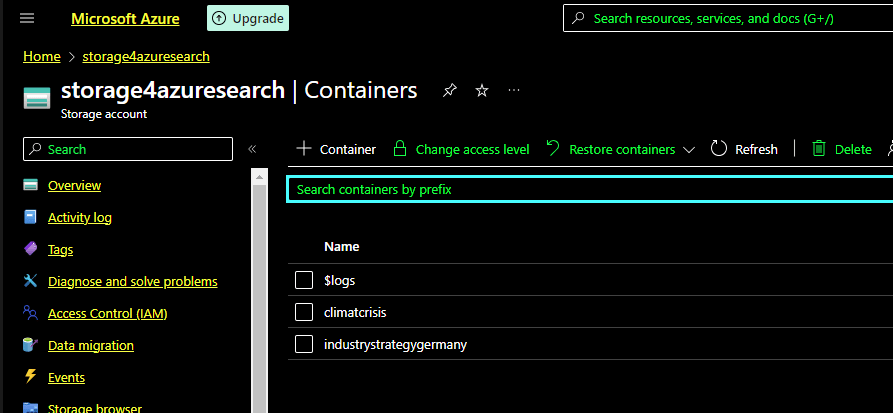
Above you see a data pool for the topic “climate crisis” and another one for the new “industry strategy of Germany” in the Azure cloud. These two data pools inside one Azure blob storage are linked to an Azure Cognitive Search Instance by using for each topic a different index. It is common practice that the blob storage and the Azure Search service run inside one resource group, which bundles the technical resources on one cluster to minimize access and retrieve time.
The whole conversation is mimicked with the following for… loop that receives the questions from a string array called prompt. The answers are returned from the response_request Python function and afterward the answers are placed as context information in the uses ChatGPT message object and additionally the prompt questions and related answers are stored in a CSV file.

The Python function reviseSearchResponse does the above-mentioned post and preprocessing of the user’s prompt input side and the post-processing when feeding the Azure Search result into the ChatGPT response stream.
So why pre- and post-processing is needed?
As one topic pool, I took the document of BMWK (German Ministry for Economy and Climate) regarding its new proposed industry strategy for Germany, addressing the new geopolitical and climate change related challenges of our time.
And then I started to ask, and you will see what problem emerges quite at the start:
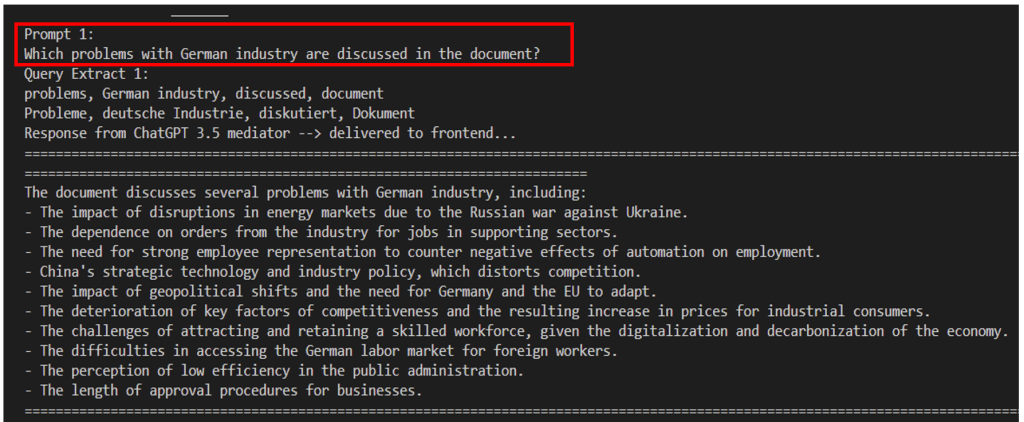
The question “Which problems with German industry are discussed in the document?” is a question with a wide range of possibilities for answering it. Though the answer contains significant topics of the document, it is incomplete, why?
Cognitive Search delivers a search result of three thousand words, which covers really all relevant topics, but the ChatGPT 3.5 can handle “only” around 4000 tokens that are again round about 4000*0.75=3000 words. But these 3000 words that ChatGPT 3.5 can handle are reserved for the words it receives, that are already blocked by the system prompt (see above) and for the words it wants to generate. In my system, I used as a threshold value to curb the response of Azure Cognitive Search by 1000 words. By this, you balance as well the response time of ChatGPT which, of course, needs more time for answering a request if it gets a higher load rather than a lower one.
But how to prevent missing relevant parts of your answer. There are many strategies to mitigate the problem, one way is to condense the response of Cognitive Search by sqeezing the text using powerful text summary Python libraries like sumy

So you use another AI which is transferring its text summary of Cognitive Search to ChatGPT, that then finally tries as its best to understand the question and relate its understanding to the condensed search results of Azure Cognitive Search to formulate an appropriate answer. And that it does by the way in incredible fast time.
Is it truly an issue in this context if the initial response to a question isn’t fully complete? You are in a conversation and if I ask a person about a complex subject, I won’t expect that he or she will give me a complete, sufficient answer in one shot, either. It’s the magic of communication that takes place between the talking people and now also talking machines, where a common context is grounded during discussion, which usually broadens your horizon.
Of course, you can fall into traps with this strategy. What happens if the user asks a quite specific question: Can you condense what is told about the microelectronics industry in chapter 2.2 b?
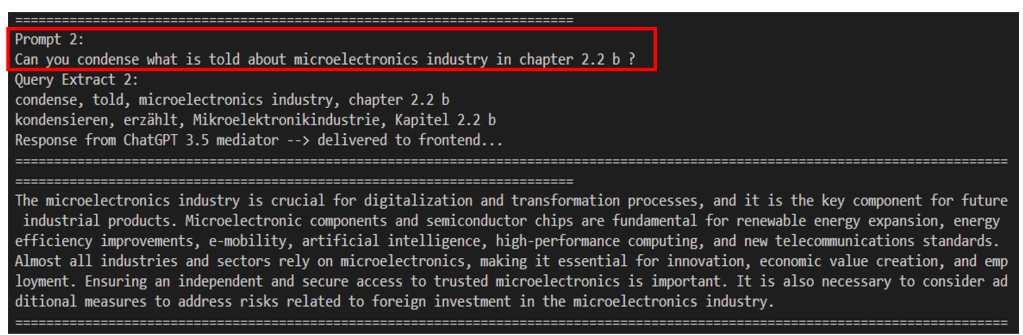
If you have bad luck, the answer of Cognitive Search will be again over 1000 words, you condense this information by sumy and that squeezes all about microelectronics so heavily that the gist of this part of the document gets lost, and you get a flaw answer.
You can mitigate this problem by looking first into the metadata of the Cognitive Search answer. Besides delivering relevant raw text information, it returns a list of relevant persons, locations, organizations and key phrases that are involved in the search results and in there you will find the term “Mikroelektronik” allowing you to seek for this term in the response specifically so that you can deliver to ChatGPT a more narrow but detailed answer as you see above.
With these two simple post-processing steps, checking whether the key terms of your query can be detected in the metadata of your Cognitive Search response respectively using another AI to condense the response to an amount of data ChatGPT can handle, you can manage already many use cases for your chatbot. At least to ask in English a German text and receive a reasonable answer in Chinese or Hebrew:
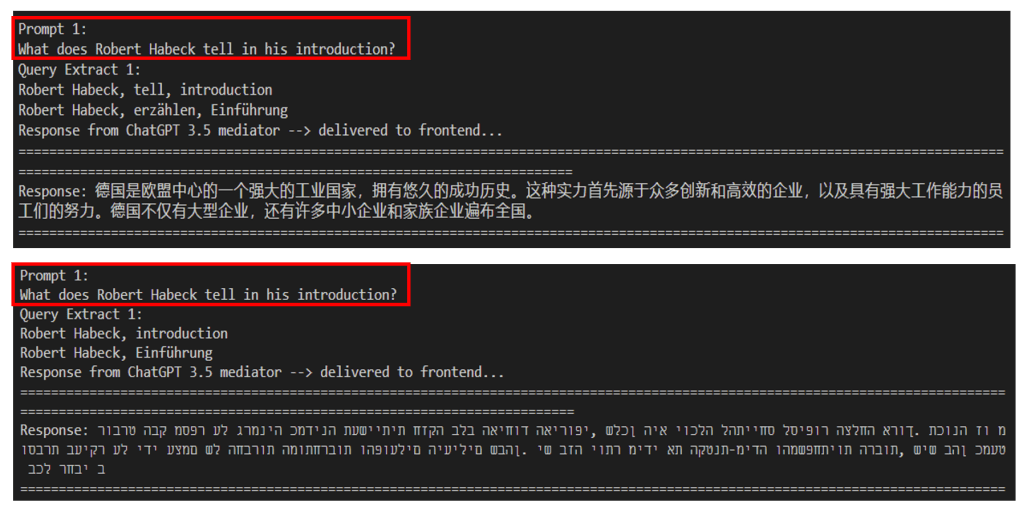
For me, at least it looks excellent 😉
If you really want to utilize your data by making them accessible using natural language, I can only recommend and encourage you to contact my colleague Volker Luegger. He and his team are experts on this matter and are currently working on proofs of concepts for two of our customers, making their data accessible by chatting.
Enabling business data of a cooperation for natural data access does not “only” require that you deliver appropriate and correct data to your client, but also you must ensure that he or she is allowed to access the data. In cooperations, complex access rules exist that mainly depend on your department and function within your corporation.
In combination with more and more capable speech recognition software like WHISPER from Open.AI, the time that we will access our computers by keyboard, touch display and something like a mouse will fade away, most probably already in a few years.
Scotty, it is time to beam me up…
 My blog